ARK: Survival Evolved Server Troubleshooting
Server missing from the browser, friends unable to connect, mods failing or settings refusing to save? Start with the symptom below and work through the likely causes.
Common ARK server problems
Server does not appear in the browser
First confirm the server process is actually running and has completed startup. If it is self-hosted, check that UDP 27015 or your configured query port is open. The in-game list can only search a limited number of servers per minute, so a new server can take a while to show up; Steam users can add it to their Steam favourites with IP:QUERYPORT instead. If your query port is above 27020, Steam’s browser won’t find the server unless you enter that query port explicitly. To check whether Steam’s master server lists it at all, the official ARK community wiki suggests Steam’s GetServersAtAddress web API with your public IP, which returns the server and its game port when it is registered.
Players cannot connect
On a self-hosted server, verify the game ports and firewall first. The defaults are UDP 7777 (game), UDP 7778 (peer port, always the game port +1) and UDP 27015 (query). ShooterGameServer does not support UPnP, so these must be forwarded by hand, and your router has to forward them to the correct local machine. If the server is reachable but players get a version error, check the branch: a server on the older preaquatica branch (358.24) only accepts players who switched to that branch in Steam’s Betas tab, and the reverse.
Port forwarding looks right but nothing works
You may be behind CGNAT. Compare the WAN address shown by your router with your public internet IP. If they are different, inbound port forwarding may not reach your home connection. Ask your ISP about a public IPv4 address or use a rented server instead.
The server crashes during startup
If the problem started after adding or updating mods, remove the newest mods first and test again. Also check recent Game.ini and GameUserSettings.ini edits for malformed values. Then check memory: the official ARK community wiki measures an empty The Island world at 3.5–4.5 GiB and an empty Genesis: Part 2 world at 10–12.5 GiB before anyone joins, with each connected player adding roughly 50–150 MiB, so a large or heavily modded map can simply run out of RAM on a small box.
Mods are missing or outdated
Confirm the Workshop IDs are correct and restart the server after updating. Players and server files need compatible versions of the same mods. Many older Workshop mods only work on the preaquatica branch (358.24), which is why some servers stay on it. If one specific mod causes the server to fail, remove it temporarily and verify the server boots without it.
Settings keep reverting
Stop the server before changing its configuration files. Editing while the server is running can result in values being overwritten when the process shuts down. Also make sure you are editing the active GameUserSettings.ini or Game.ini (in ShooterGame/Saved/Config/WindowsServer or LinuxServer) rather than an unused copy. If characters or the world itself disappear after a restart, the server probably can’t write to its install folder: check that the account running it can create ShooterGame/Saved, and remember the server autosaves every 15 minutes by default, so a crash in the first 15 minutes leaves nothing saved.
Steam players can join but Epic players cannot
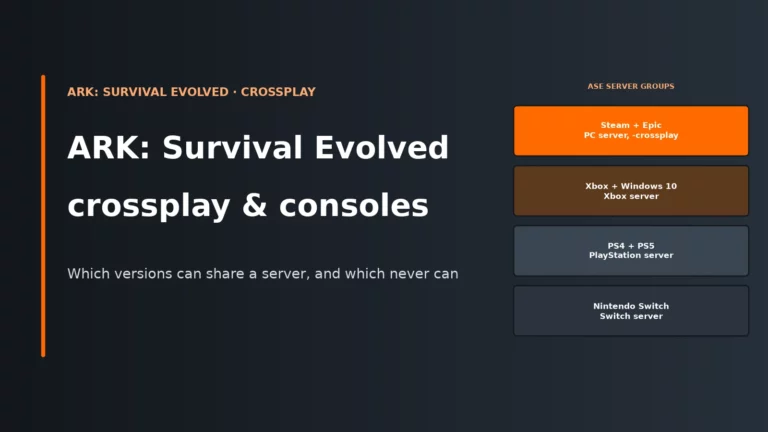
A dedicated ASE server intended for Steam and Epic players needs the -crossplay launch option and -PublicIPForEpic= set to its public IP. Epic players find servers through Epic’s own service over the normal web ports 80 and 443 (TLS 1.2), so outbound web traffic must not be blocked, and on Windows Server editions the wiki says you must enable TLS 1.2 and install Amazon’s r2m02.crl revocation list into Trusted Root Certification Authorities or Epic players won’t see the server. Steam Workshop mods are another hard limit because Epic clients cannot load them. If the server is modded, test it without mods before chasing network problems.
Players disconnect or experience severe lag
Check CPU usage, available RAM and whether a particular mod or large base area triggers the issue. Network problems can cause disconnects, but ARK server simulation can also slow down when the CPU is overloaded even if plenty of RAM remains available. The official ARK community wiki notes that an ASE server instance is well served by 2 logical cores and never scales beyond 4, so single-thread speed matters more than core count.
Quick symptom reference
| Problem | Check first |
|---|---|
| Server missing from browser | Query port, browser filter, server fully started |
| Cannot connect | 7777, 7778, query port, firewall, game branch |
| Port forwarding fails | CGNAT and router WAN IP |
| Crash on startup | Recent mods, config edits, memory usage |
| Mods not working | Workshop IDs and server/client versions |
| Settings revert | Stop server before editing configuration |
| Epic player cannot join | -crossplay, -PublicIPForEpic and Workshop mods |
| Lag or disconnects | CPU load, RAM, mods and network |
The order I would troubleshoot an ARK server
- Restart the server.
- Confirm the server and clients are fully updated.
- Temporarily remove recently added mods.
- Check recent Game.ini and GameUserSettings.ini edits.
- Confirm the server ports and firewall rules.
- Test whether Steam can see the server through its server browser.
- Check CPU and RAM usage while the server is running.
- If self-hosting still fails, investigate CGNAT.
Self-hosting ports
| Default | Use |
|---|---|
| UDP 7777 | Main ARK game port |
| UDP 7778 | Peer port (always game port +1) |
| UDP 27015 | Query port (Steam’s server browser only) |
| TCP 27020 | Optional RCON administration |
If you use custom ports, use the values from your launch parameters or hosting panel instead.
When renting a server is easier
If your problem is purely home networking, especially CGNAT or unreliable port forwarding, renting removes most of that layer completely. You still control the world, settings and mods, but the host handles the public-facing network.
See our best ARK: Survival Evolved server hosting comparison if you want to move the world to a managed server. Running the Unreal Engine 5 remake instead? See our ARK: Survival Ascended server troubleshooting guide.
ARK server troubleshooting FAQ
Why is my ARK server running but not showing up?
The server browser may not have found it yet, or the query port may be blocked or configured incorrectly. Steam players can test the server through the Steam server browser using the IP and query port; if the query port is above 27020 it has to be entered explicitly.
Which ports does ARK: Survival Evolved use?
The common defaults are UDP 7777 for the game, UDP 7778 as the adjacent game or peer port, UDP 27015 for Steam queries and TCP 27020 for optional RCON.
Why do my ARK server settings keep resetting?
Stop the server before editing configuration files. A running server can overwrite configuration values during shutdown.
Why does my ARK server crash after adding mods?
A broken, outdated or incompatible mod is a common cause. Remove newly added mods one at a time and confirm the server can boot before adding them back.
Why can’t Epic Games players join my Steam ARK server?
The server must run with -crossplay and -PublicIPForEpic set to its public IP. Epic players cannot load Steam Workshop mods, so a server running Workshop mods keeps them out.