
Path of Titans Server Settings Explained
Opened Game.ini and wondering what half of it does? Here is what the main Path of Titans server settings change for your players, the defaults, the trade-offs, and the traps that make a setting silently do nothing: the wrong section, a missing override flag or editing while the server runs.
Most lines belong under [/Script/PathOfTitans.IGameSession]. Time of day, day and night length, group size and a few social settings belong under [/Script/PathOfTitans.IGameMode]. A correct line under the wrong header does nothing.
Many cooldown and world values are ignored until the related b...Override flag is set to true. If a number seems to have no effect, check for its override before changing anything else.
Whitelists, rules, MOTD text, admin roles, curve edits, mod IDs and the required -Database choice all live outside the main file. Knowing which file controls what saves a lot of wasted restarts.
Realism, quick growth, PvP combat and private friends servers all use the same base game. What changes is the mix of growth pace, death penalties, information on the HUD, social limits and travel convenience.
Where Game.ini lives and how to edit it safely
The main server file is usually PathOfTitans/Saved/Config/WindowsServer/Game.ini. On other operating systems the platform folder name changes, but the rest of the path stays the same, such as LinuxServer. The file is not created by the download or update script; it appears after the server first starts, even if that start is not fully successful.
Path of Titans normally writes Game.ini when the server shuts down. That is why live editing often ends with “my file reset itself”. The safe pattern is simple:
- Stop the server fully.
- Edit
Game.iniand save it. - Start the server again so the new values load.
Keep each option on its own line. Comments with ; are allowed, but the game may remove them when it saves, so keep real notes in a separate document. Also, do not panic if some lines vanish after a clean restart: options left at default values may be removed from the file by the game.
The three important headers are:
[/Script/PathOfTitans.IGameSession]for most server behaviour.[/Script/PathOfTitans.IGameMode]for time of day, day and night length, group size, spawn radius and creator mode save.[BattlEye]for anti-cheat, such asbEnabled=true.
If a setting looks right but changes nothing, check the header before you do anything else.
| File or argument | What it controls | What catches people out |
|---|---|---|
Game.ini |
Core server settings | Wrong section header means the line is ignored; default-value lines may disappear on save. |
Commands.ini |
Admin roles, permissions and reserved slot access | ReservedSlot=True is granted per role here, not in Game.ini. |
Saved/whitelist.txt |
Whitelist entries by Alderon Games ID | Use AGIDs such as 123-456-789, each on its own line; whitelist only becomes active once the file has at least one ID. |
Saved/Rules.txt |
Rules popup on first login | Players must click accept or they are disconnected; /rules shows it again later. |
Saved/MOTD.txt |
Message shown on every login | Uses game formatting tags like <title> and colour tags, not HTML or Markdown. |
CurveOverrides.ini |
Stat curve changes | If the same curve is present here and in Game.ini, this file wins. |
GameUserSettings.ini |
Mods via [PathOfTitans.Mods] EnabledMods= |
Needed for modded maps and modded species; a map name alone is not enough. |
| Startup arguments | Boot-level settings like -Port=7777, -BranchKey=production, -ServerGUID and required -Database=Local or -Database=Remote |
These are not read from Game.ini. If -Database is wrong, related features will not behave as expected. |
Use this file map first when a setting seems to be missing rather than broken.
| Where it lives | Gameplay rules | Admins and access | Players see text from it |
|---|---|---|---|
| Game.ini [IGameSession] | Yes | Partly | No |
| Game.ini [IGameMode] | Yes | No | No |
| Commands.ini | No | Yes | No |
| whitelist.txt | No | Yes | No |
| Rules.txt and MOTD.txt | No | No | Yes |
| CurveOverrides.ini | Yes | No | No |
| Startup arguments (-Database) | Partly | No | No |
Server identity, map choice and access control
ServerName is the public identity of the server, and Path of Titans expects underscores for spaces. That sounds minor, but it matters for consistency in server lists and screenshots. Decide the name once, then keep it stable so returning players recognise it quickly.
ServerMap controls the map, and the value must match what the server expects. Panjura is the default, Island is used for Gondwa, and Riparia loads Riparia. For a modded map you also need the mod ID in GameUserSettings.ini, and the map name must match the mod exactly. The first download can take 10-15 minutes, so a “stuck” first boot is often just the server pulling the files it needs.
MaxPlayers is not always the real ceiling players feel. ReservedSlots defaults to 20, so if MaxPlayers=100 the server can still reach 120 when users with a role that has ReservedSlot=True join through Commands.ini. That is useful for staff access on a full server, but it can also confuse regulars if too many people hold reserved access. Give it to admins and moderators who actually need it.
For access control, a password is quick and simple through ServerPassword. A whitelist is stricter: set bEnforceWhitelist=true and populate whitelist.txt with AGIDs. Passwords leak; whitelists do not in the same way. Also note that Commands.ini roles bypass the whitelist, so test with a normal account if you want to verify it properly. You can add players by RCON or chat command, which is far less disruptive than restarting for every new entry.
bServerPaidUsersOnly decides whether free-to-play users are allowed. Leave it false if you want the lowest barrier to entry. Turn it on only if your community specifically wants a paid-only gate.
ServerDiscord takes only the invite code, such as aY5CzgZk, not the full address. Once it is set, a Discord button appears on your message of the day, so players can find your community without you cramming an invite into the server name.
Growth and progression: what pace your server actually sets
The first big identity choice is bServerGrowth. If it is true, players grow through life stages. If it is false, everyone spawns as an adult and existing characters are bumped to adult as well. That is not a small tuning change; it switches the whole server away from survival progression and towards immediate roaming, social play or combat.
QuestGrowthMultiplier changes how much growth comes from active questing. Raising it rewards movement and route planning. The direct hardware cost is tiny, because you are not adding AI or map simulation; you are changing the reward for actions already happening. The player-facing trade-off is simpler: higher quest growth shortens the vulnerable juvenile phase, but it also makes survival mistakes feel less meaningful because recovery is faster.
GlobalPassiveGrowthPerMinute adds time-based growth without requiring quests. Full growth is 1, so 0.005 means roughly 200 minutes, about 3.3 hours, to reach adult. Passive growth makes quieter servers feel less grindy and helps groups stay together even if not everyone likes running tasks. The downside is that it weakens the reason to move, and if you pair it with no AFK kick, some players will simply idle their way to adulthood.
bServerHatchlingCaves=true keeps the tutorial cave flow. Players spawn at 0 growth and leave at 0.25, using HatchlingCaveExitGrowth=0.25. Turning caves off drops players straight into the world at 0.25. That is faster and suits closed friends or combat-heavy servers, but it removes the gentler onboarding that helps brand new players understand the server before they are exposed to the wider map.
A useful rule of thumb is this: quest growth creates movement, passive growth creates patience. If your map feels empty, passive growth alone will not fix that. If your players feel trapped in endless task loops, passive growth or a higher quest multiplier usually will.
Death penalties: how punishing the server feels after a mistake
Death settings decide whether players treat combat as a serious risk, a small setback or a fast route back to action. The default penalties are not the same for every death type, and combat costs far more than a bad fall:
| Death type | Default marks penalty | Default growth penalty | What players feel |
|---|---|---|---|
| Combat death | 25% |
10% |
Fighting has real stakes, especially for adults trying to bank marks. |
| Fall death | 5% |
2% |
Traversal errors hurt, but they do not usually end a play session. |
| Survival death | 10% |
5% |
Water, food and poor route choices still matter. |
MinGrowthAfterDeath=0.5 sets a floor under repeated deaths, and bLoseGrowthPastGrowthStages=true allows losses to push a character back through stages until that floor is reached. Together, those settings decide whether repeated failure feels recoverable or demoralising. If your regulars start avoiding every fight because recovery is too long, this is where to look first.
bLoseQuestsOnDeath=true matters more than it looks. Losing active quest progress increases the emotional cost of dying far more than a small percentage loss alone. It is good for high-tension survival, but it can feel harsh on relaxed social servers where players are trying to group up rather than defend territory.
bServerAllowChangeSubspecies=true and ChangeSubspeciesGrowthPenaltyPercent=25 let players adjust builds without a full reroll, but the penalty stops constant min-max swapping. That is a community stability setting as much as a balance setting.
Leave bPermaDeath=false. It is documented as unfinished and may break character data. If you want harder survival, use stronger growth and marks penalties instead of risking the database.
Quests, marks and the override-flag pattern
The most common Path of Titans config mistake is changing a number and missing the override that tells the server to use it. Many quest and cooldown settings follow the same pattern: the value line is only read when the matching b...Override line is set to true.
[/Script/PathOfTitans.IGameSession]
bOverrideLocalQuestCooldown=true
LocalQuestCooldown=3600
Without the first line, the server ignores the second one. The same logic applies to LocationQuestCooldown, TrophyQuestCooldown and some other caps. If a change seems dead on arrival, look for the override before you assume the host panel has broken anything.
QuestGrowthMultiplier=1changes growth per quest. Set it higher for faster progression without giving free adult characters.QuestMarksMultiplier=1.0changes marks income. This is useful when you want abilities and cosmetics unlocked faster without also speeding growth.LocalQuestCooldown=3600andLocationQuestCooldown=3600shape how quickly players can repeat efficient routes. Shorter cooldowns concentrate traffic; longer ones spread people across the map.bTrophyQuests=truewithTrophyQuestCooldown=1800makes trophy turn-ins part of the progression loop. That can create contested hand-in points, which is good for activity and bad for quiet realism.MaxGroupQuests=2limits how much group play can stack shared progress. If large groups level too efficiently, this setting is part of the answer.bServerLocalWorldQuests=true,bPOIDiscoveryRewards=trueandbEnableExploreQuests=trueencourage movement and discovery instead of camping a single profitable route.ServerMinTimeBetweenExplorationQuest=30andMaxCompleteQuestsInLocation=3help control repetition, but that location cap only applies whenbOverrideMaxCompleteQuestsInLocation=true.
Quest settings do not usually cost much server performance on their own. What they do change is player distribution. If a tweak works, you will see fewer complaints about “dead time” and a wider spread of activity instead of everyone orbiting a tiny set of hotspots.
World simulation: water, critters, weather, time and corpse cleanup
Water and food systems
bServerWaterQualitySystem=true makes water management part of survival rather than a background prop. If bEnableWaterRegeneration is turned off, make sure the map has water restoration quests, otherwise water can run out. That can be a deliberate hardcore choice, but it often ends up feeling like the server is broken rather than challenging.
If you do override regeneration, remember what the server is doing behind the scenes. A lower WaterRegenerationRate means water updates happen more often. That costs world-simulation time on the server and can cause lag if pushed too far. The documented default cycle is 60 seconds, with WaterRegenerationValue=10 and WaterRainRegenerationIncrement=20.0. Use those as a stable baseline before trying anything stricter.
Critters, fish and weather
bServerFish=true and bServerCritters=true shape how reliable small food sources are. bCritterBurrows=true, ServerMaxCritters=200 and ServerCritterDensityMultiplier=0.75 make the world feel alive, but they also add AI and spawn management work. If a busy server feels stuttery, ecology density is more likely to matter than a simple text setting such as chat or MOTD.
Weather is mainly about atmosphere and visibility. WeatherLengthVariation=(X=10,Y=20) and WeatherBlendVariation=(X=1,Y=2) control how long conditions last and how sharply they transition. These are not usually your biggest performance concern, but faster, more obvious swings do change how readable combat and travel feel.
Day, night and world cleanup
Time settings live under [/Script/PathOfTitans.IGameMode], not IGameSession. ServerStartingTime=1350 sets the opening time, bServerDynamicTimeOfDay=1 enables a moving cycle, and ServerDayLength=60 with ServerNightLength=30 sets the pace. Dynamic time creates atmosphere and ambush cover. Fixed time is common on combat-focused or private servers that want visibility and consistency.
ServerDeadBodyTime=0 means a body stays until fully decayed; 60 removes it after 60 seconds even if food remains. This does not change food value, only cleanup timing. Shorter body times reduce clutter and some world persistence, while longer ones support scavengers and a harsher ecosystem.
ServerRespawnTime=45 controls how long a player must be alive before using /respawn. Keep it high if you want to stop players using respawn as cheap transport and to avoid extra corpse piles. ServerFootprintLifetime=60 supports tracking play, while 0 disables footprints entirely. bServerFallDamage=true is another realism lever: it barely affects hardware, but it strongly affects movement risk and escape routes.
Map, HUD, chat and social systems
How much information players get
bServerAllowChat=true and bServerGlobalChat=true do almost nothing to performance, but they change community tone immediately. Global chat makes help, moderation and social chatter easy. Turning it off forces more local interaction and can support realism rules, but it also makes staff communication and quick support slower.
bServerAllowMap=true, bServerAllowMinimap=true and bServerAllow3DMapMarkers=true remove navigation friction. That makes casual and family-style servers easier to use, but it also compresses the map because players reach objectives and each other more efficiently. If you want wandering, uncertainty and route knowledge to matter, reduce HUD guidance rather than only increasing penalties.
bServerNameTags is off by default. Set it to true and every player on the server sees player nametags, which helps friends find each other and makes moderation easier, but it also takes away the uncertainty of not knowing who that silhouette on the ridge is. bServerShowMapIconPopularLocation=false by default hides hotspot icons, while ServerMapIconPopularLocationPlayerCount=10 decides when a location counts as popular. Showing hotspots boosts fast action; hiding them preserves discovery.
Groups and nesting
Group settings sit in IGameMode. MaxGroupSize=10 is a slot system, and GroupSlotSizeOverrides can make larger species consume more slots than smaller ones. That is one of the best tools for shaping herd and pack size without banning social play outright. bDisableGrouping=false leaves groups available, while bServerRestrictCarnivoreGrouping and bServerRestrictHerbivoreGrouping can enforce same-species grouping for stricter realism.
Being in combat stops a dinosaur healing and logging out. With bServerCombatTimerAppliesToGroup=true the whole group shares that combat timer, so a groupmate cannot slip away to safety while a packmate is fighting; set it to false and only players who attack or are attacked get the timer. MaxGroupLeaderCommunicationDistance=50000 sets how far apart group members can be and still see each other.
bServerNesting=true supports longer-term family play. MinNestingGrowth=0.75 stops immature characters from creating nests too early, bNestsInvulnerable=false keeps nests contestable, and NestResourceMultiplier=1.0 decides how demanding the setup is. Safer nests support community events and roleplay; vulnerable nests create stories but also arguments if expectations are not clear in your rules.
Home caves, ability editing and waystones
bServerHomeCaves=true, bServerWellRestedBuff=true and bServerHungerThirstInCaves=false make caves genuine recovery spaces. bServerEditAbilitiesInHomeCaves=true and bServerEditAbilitiesAtNest=true keep build changes tied to safe locations. If both are false, players can edit anywhere, which is convenient but removes part of the risk around preparation and travel.
bServerWaystones=true and bServerAllowInGameWaystone=true shrink the map socially by making meetups easier. bServerWaystoneCooldownRemoval=true lets players spend marks to skip the cooldown, while OverrideWaystoneCooldown=-1 keeps the default timer. This is excellent for closed groups and terrible for servers trying to preserve distance, migration and isolation as meaningful parts of play.
The home cave camping debuff is a safety valve. bServerHomecaveCampingDebuff=true punishes lingerers near cave exits, with HomecaveCampingDistance=20000 cm and HomecaveCampingDelay=180 seconds available through their override flags. If your community complains about cave exit traps more than open-world hunting, this setting usually matters more than a harsher rules document.
Moderation, anti-abuse and restart planning
AFKDisconnectTime=600 is mainly a fairness tool, and it matters even more if passive growth is enabled. Without an AFK kick, idle characters can gain progress with almost no exposure to the risks your survival settings are trying to create. If players keep complaining about “empty adults” and silent hotspots, AFK growth is worth checking.
MaxClientPingMs=0 leaves ping kicks off. Enabling a limit can reduce warping and hit-registration arguments, but it also removes players who may only have short instability rather than a permanently bad route. Use it alongside MaxClientPingDuration so brief spikes do not turn into pointless kicks.
ServerLogoutTime=60 forces a proper safe-log delay on the logout menu; 0 makes logging out instant. That choice is about abuse prevention, not performance. A short or zero logout time makes escaping bad situations too easy, while a proper timer preserves risk. ServerLogoutAction lets you choose whether the character stays standing, sits or sleeps during that process.
bServerAntiRevengeKill=true only works with a remote database, which means -Database=Remote at startup. It adds a 10-minute login timer to other characters within RevengeKillDistance=100000, which is 1 km. This is specifically aimed at character swapping for immediate revenge. If you run -Database=Local, do not expect this protection to save you.
Database choice itself is important. -Database=Remote uses the Alderon-managed cloud database, protects you from losing characters if the server folder is deleted and allows hived characters across several servers on the same account. -Database=Local stores data in Saved/DatabaseCache, which is simpler for isolated setups but needs regular backups.
SpeedhackDetection=1 logs suspicious behaviour, 2 kicks and 3 bans. SpeedhackThreshold=10 detections per minute is there to help avoid false positives from packet loss, and 0 disables the threshold. Logging first is the sensible start: it shows whether you have a real cheat problem or just poor network conditions.
bServerAllowReplayRecording=false and bServerAllowAnselMultiplayerPausing=false are both about abuse reduction. They do not transform performance, but they do remove tools players can use to scout or gain information outside normal play.
For restarts, use the built-in options in Game.ini where possible because they warn players in game. You can run timed restarts with RestartLengthInSeconds=10800 or scheduled restarts with explicit local times. Pick one style and make it predictable.
[/Script/PathOfTitans.IGameSession]
bServerAutoRestart=true
bUseScheduledRestartTimes=true
ScheduledRestartTimes=0300
ScheduledRestartTimes=1500
You do not need to list warnings yourself: the defaults already notify players every second in the last minute and at regular steps before that. Add RestartNotificationTimestamps lines (seconds before the restart, one per line) only if you want a different pattern.
Species roster, stat tweaks and update-proofing
There are two clean ways to control the playable roster. AllowedCharacters=Name creates a strict whitelist of species. DisallowedCharacters=Name allows everything except the listed species. The choice affects maintenance as much as balance.
AllowedCharacters is best for tightly curated realism or event servers because nothing new appears until you add it yourself. The trade-off is admin work: every new official dinosaur stays blocked until you review and add it. DisallowedCharacters is easier for open communities that only want to ban a few outliers, but new official dinosaurs will appear automatically after updates unless you explicitly block them.
Names must be spelled exactly as the game expects, such as Tyrannosaurus, Albertaceratops or Latenivenatrix. The same pattern applies to AllowedCritters and DisallowedCritters. For modded species, use the name provided by the mod description rather than guessing from the display name.
For stat changes without building a mod, use CurveOverrides. Species curves can change values such as thirst or health progression, and a curve holds 5 values across Hatchling, Juvenile, Adolescent, Sub-Adult and Adult. There are also global curves, including examples like Global.InCombatDuration at 30 and Global.LoginDebuffDuration at 60. The real cost is upkeep: every curve line is something to re-check when the game rebalances that species.
If the same curve exists in both Game.ini and CurveOverrides.ini, the separate curve file wins. Keep that in mind when a stat change “doesn’t stick”. Also, big balance overhauls are usually easier to manage as a proper mod rather than a long list of one-off curve lines.
MaxCharactersPerPlayer=30 and MaxCharactersPerSpecies=1 shape alt behaviour. More available slots support experimentation. A strict per-species cap reduces duplicate specialist builds and keeps character choice more meaningful.
Starting points by server style and fast troubleshooting
Path of Titans does not have a single server game mode switch. What players call realism, casual, quick growth or combat is just a combination of the settings above. Use the matrix below as a starting point, then fine-tune around your community’s complaints rather than changing everything at once.
| Setting | Realism | Casual | Combat, no growth | Friends only |
|---|---|---|---|---|
| bServerGrowth | Yes | Yes | No | Yes |
| Passive growth | No | Yes | No | Partly |
| Hatchling caves | Yes | Yes | No | Partly |
| Global chat | No | Yes | Yes | Yes |
| Map and minimap | Partly | Yes | Yes | Yes |
| Nametags | No | Yes | Yes | Yes |
| Whitelist or password | No | No | No | Yes |
| Setting | Realism server | Casual / quick-growth server | Combat / no-growth server | Closed friends server |
|---|---|---|---|---|
bServerGrowth |
On | On | Off | Your choice |
GlobalPassiveGrowthPerMinute |
Off or lower | 0.005 or higher |
Off | Lower or 0.005 |
QuestGrowthMultiplier |
Default | Higher | 0 or irrelevant |
Default or higher |
| Hatchling caves | On | On | Off | Your choice |
| Death penalties | Default or harsher | Lower | Lower | Lower |
| Global chat | Off or restricted | On | On | On |
| Map, minimap and 3D map markers | Off or reduced | On | On | On |
| Name tags and popular locations | Reduced | On / visible | On / visible | On / visible |
| Day and night | Dynamic | Dynamic, shorter nights | Fixed daytime | Fixed or dynamic |
| Group rules | Restrictive | Open | Open | Open |
| Home caves and waystones | On, but limited convenience | On | On | On |
| Access control | Open or whitelist | Open | Open | Password or whitelist |
If a setting still appears dead, follow the checks in this order before rewriting the whole file.
| Symptom | Likely cause | First fix |
|---|---|---|
| Setting ignored | Wrong section header or missing b...Override=true |
Move the line to IGameSession or IGameMode as appropriate and add the matching override flag. |
| File reset or keys vanished | Edited while the server was running, or the game removed default-value lines on save | Stop the server first, re-edit, then accept that default keys may disappear again after a clean shutdown. |
| Wrong map loads | Used the display name instead of the server value, or forgot the mod enable line for a modded map | Use Panjura, Island for Gondwa, or the exact mod map name plus the mod ID in GameUserSettings.ini. |
| Some players cannot join after an update | Version mismatch or a mod has not updated yet | Check that the server is fully updated, then verify every required mod and its ID. |
| New dino appeared | You are using DisallowedCharacters or no roster lock at all |
Add that species to DisallowedCharacters, or switch to AllowedCharacters if you want approval-first updates. |
| Water running out | bEnableWaterRegeneration is off, or regeneration was overridden badly |
Turn regeneration back on or return to the documented default behaviour before tuning again. |
| Whitelist not working | bEnforceWhitelist=true is missing, whitelist.txt is empty, or you tested with a bypass role |
Enable the flag, add at least one AGID, then test with an account that does not have a Commands.ini role. |
| Comments disappeared | The game rewrote Game.ini on shutdown |
Keep notes outside the file; comments may be removed when the server saves. |
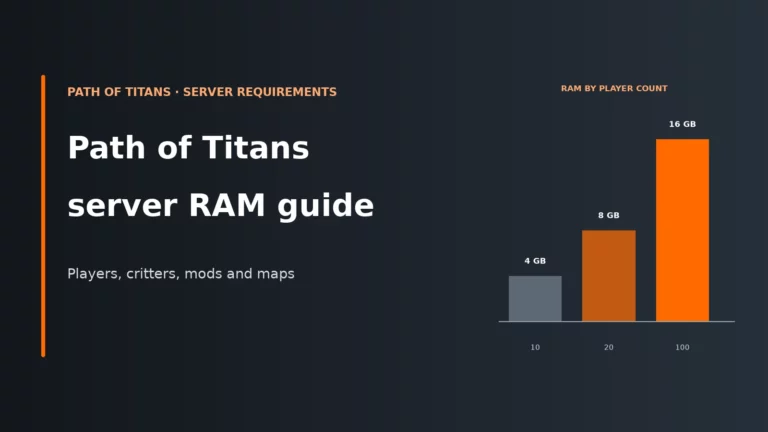
If you are choosing where to run the server, prioritise full file access, reliable scheduled restarts and proper backups over a shiny control panel. Those three things matter more than almost any cosmetic feature once you start editing Game.ini for real. Before you scale up, it also helps to check the Path of Titans server requirements, RAM and ports guide so your plan and network setup match the kind of world you are trying to run.
Look for full access to the config files, sensible restart scheduling and dependable backups, especially if you plan to use a local database or curated mod list.
Compare the best Path of Titans server hostsPath of Titans server FAQ
Where is the Path of Titans server Game.ini?
It is usually at PathOfTitans/Saved/Config/WindowsServer/Game.ini. On other operating systems, the platform folder changes, such as LinuxServer, but the rest of the path stays the same. The file is created after the server first starts, not by the initial download script.
Why do my Path of Titans server settings not work?
The usual reasons are a line under the wrong section header, a missing override flag or editing the file while the server is still running. Path of Titans also removes some default-value lines when it saves, which makes it look as though the file has ignored you. Check header, override and shutdown order before changing anything else.
How do I make growth faster on a Path of Titans server?
Use QuestGrowthMultiplier for faster active progression and GlobalPassiveGrowthPerMinute for time-based growth. A documented example is 0.005, which is roughly 200 minutes to full growth. If you want immediate adult characters instead, set bServerGrowth=false.
How do I disable a dinosaur on my Path of Titans server?
You can either add it to DisallowedCharacters or use AllowedCharacters and only list the species you want available. AllowedCharacters is stricter and blocks future official species until you add them manually. Make sure the species name matches the game’s spelling exactly.
Does Path of Titans have game modes for servers?
No, not as a single server switch. Realism, casual, quick-growth and combat servers are built by combining growth, death, HUD, map, grouping, cave and travel settings. Think in terms of a ruleset, not a mode selector.
More Path of Titans server guides
Compare hosts or size your server before you scale up.
Keep a copy of your finished Game.ini outside the server folder. Because the game strips comments and default lines when it saves, your own copy is the only place your notes and reasoning survive.