
Does Icarus Dedicated Server Crossplay Work on Console and PC?
No. An Icarus dedicated server is for PC players. Console Edition does not support cross-play, so PS5 and Xbox friends cannot join it, and they cannot play with each other either. Here is how to plan the right setup for your group.
Not possible. The Console Edition store pages state that it does not support cross-play, so a rented PC server cannot pull in PS5 or Xbox friends.
Also not possible. There is no console-to-console cross-play either, which catches groups who assume that part is easy.
Yes, for PC players. RocketWerkz documents a dedicated server with a maximum of eight players, and recommends it for Open World sessions.
Same-platform only, and up to four players on a drop. Online play needs PlayStation Plus on PS5, or Xbox Game Pass Essential, Premium or Ultimate on Xbox.
Who can actually play Icarus together
Start with the platforms in your group, not with a server plan. Icarus on PC and Icarus: Console Edition are separate releases. The PC game, from RocketWerkz, supports online co-op for up to eight players and dedicated servers. Console Edition, from GRIP Studios, launched on PlayStation 5 and Xbox Series X|S on 26 March 2026. Its store pages describe co-op for up to four players and state plainly that it does not support cross-play.
“Does not support cross-play” is broader than “PC cannot join console”. It means sessions stay inside one platform. A PS5 player joins other PS5 players. An Xbox player joins other Xbox players. A PC player joins other PC players. There is no shared pool sitting behind a host-panel tick box.
Read the matrix first. Each cell is a yes or no for sharing one session, including a PC dedicated server.
| This player | PC dedicated server | PS5 session | Xbox session |
|---|---|---|---|
| PC player | Yes | No | No |
| PS5 player | No | Yes | No |
| Xbox Series player | No | No | Yes |
That split is why mixed groups get stuck after they have already picked hosting. A dedicated server does not translate platforms. It only gives a PC crew an always-on prospect that nobody has to host from their own game client.
| Your group | What works | What does not work |
|---|---|---|
| Everyone on PC | A player-hosted session or a dedicated server, up to eight players | Nothing platform-related. This is the only setup that can use a dedicated server. |
| Everyone on PlayStation 5 | Host-based co-op on PS5, up to four players, with PlayStation Plus for online play | Joining a PC dedicated server, a PC-hosted session, or an Xbox session |
| Everyone on Xbox Series X|S | Host-based co-op on Xbox, two to four players, with Xbox Game Pass Essential, Premium or Ultimate for online play | Joining a PC dedicated server, a PC-hosted session, or a PlayStation session |
| PC mixed with PS5 or Xbox | Separate sessions on each platform | One shared world. No dedicated server setting opens this up. |
| PS5 mixed with Xbox | Separate sessions on each console | One shared drop between the two consoles |
Why a dedicated Icarus server cannot include console friends
A dedicated server is software that runs the prospect on its own, instead of inside one player’s game client. RocketWerkz publishes that software for PC and documents how PC clients join it. The Steam page also says dedicated servers are free to run and recommends them for Open World sessions, which is the mode where a crew wants the same world waiting between drops.
Console Edition is a different product. Its store listings describe solo play or co-op with up to four players on a drop. They do not describe joining a PC dedicated server, and they state that cross-play is not supported. Xbox lists the multiplayer capability as online co-op for two to four players. There is no official path from a PS5 or Xbox client into the PC dedicated-server browser.
The player caps underline the same split. On PC, the official dedicated-server setting MaxPlayers accepts a minimum of 1 and a maximum of 8, which matches the Steam co-op limit of eight. On console, a drop is shared by up to four players. You cannot raise a console session to eight by renting a bigger PC plan, and you cannot fill those eight PC slots with console clients.
That is also why “Icarus server hosting” pages you see from PC hosts are talking to Steam players. The official join path lives in the PC game: pick your character, open Join Session from the HAB menu, switch the browser to dedicated servers with the toggle in the top-right corner, then select the server. If no prospect is running, you land in the server lobby instead of on the planet, where a prospect or outpost can be started or resumed.
None of those screens are a workaround for Console Edition. If someone in the group is on PS5 or Xbox, they will not appear in that dedicated-server browser, and they cannot Direct Connect their way around the platform split.
How PC players join a dedicated Icarus server
If your group is all on PC, the dedicated server is the setup that matches Open World play. The world then lives on the server rather than on whoever happened to click host. RocketWerkz’s join steps are short:
- Launch Icarus and select your character.
- Choose Join Session from the HAB menu.
- Use the toggle in the top-right corner of the session browser to switch it to dedicated servers.
- Select your server and join it.
If the server is not running a prospect, you arrive in the server lobby. From there you can start a new prospect, load a saved one or resume the last session. That lobby also exposes the server’s admin commands, so treat the admin password as something only the owner should know.
Two settings in ServerSettings.ini matter before you send the name around:
- JoinPassword locks the server. Leave it empty if anyone should be able to join, or set one and share it with the crew. This is the password players need to enter the session, not the admin password.
- MaxPlayers caps who can be in at once. The official range is 1 to 8. Setting it above 8 does nothing useful, because eight is the dedicated-server maximum.
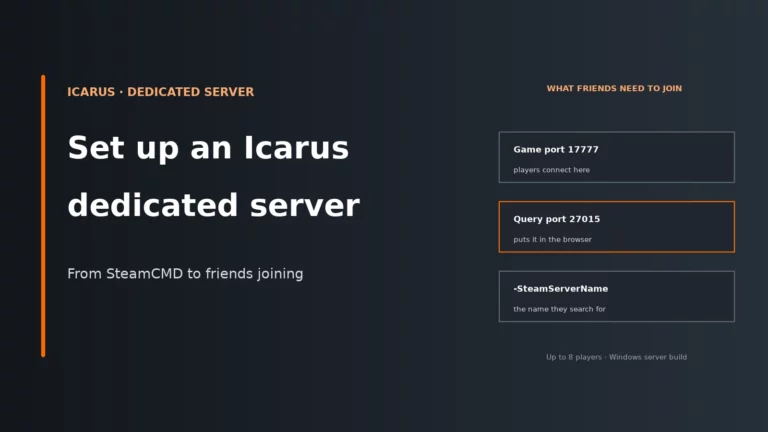
The on-screen session name is set with the -SteamServerName launch argument, not with the SessionName line. RocketWerkz notes that SessionName currently does nothing, and the command-line name is limited to 64 characters. If friends cannot find the server by name, check that launch argument before you assume the server is down.
-SteamServerName="Our Icarus crew"
JoinPassword=yourjoinpassword
MaxPlayers=8
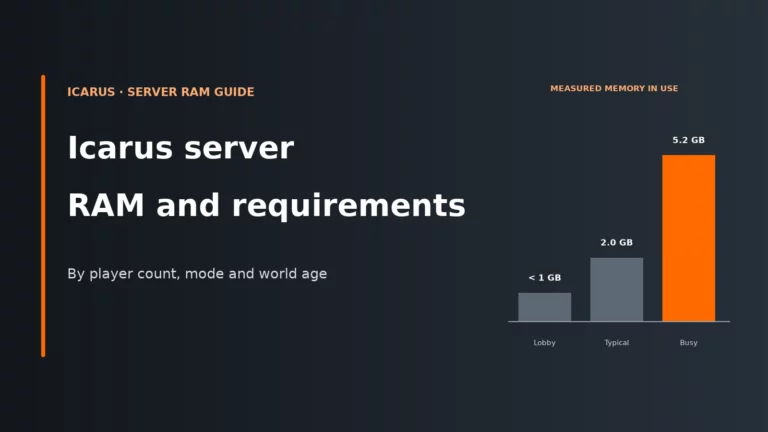
For RAM and CPU sizing once the whole PC crew is on one Open World, see our guide to Icarus dedicated server requirements and RAM by player count.
How to plan the right setup for your group
Work through the questions below before anyone pays for hosting or buys a second copy of the game. The expensive mistake is renting a PC dedicated server for a group that also includes console players, then discovering those friends have no way in.
If everyone is on PC
You have two legitimate options. One person can host from their own game and invite up to eight Steam friends into that session. That is simple for a short drop, but the session is tied to the host’s game client. The other option is a dedicated server, which RocketWerkz recommends for Open World. The prospect stays on the server, the lobby can resume it after a restart, and the host’s PC is free to play instead of also simulating the world.
Dedicated servers are free to run yourself if you want to handle the install and ports, or you can rent one from a game host and skip that work. Either way, every player still needs their own PC copy of Icarus. Hosting does not replace a game licence.
If everyone is on the same console
Stay on that console. A PS5 group plays a PS5 session; an Xbox group plays an Xbox session. Console Edition supports up to four players on a drop, so a five-person console group cannot fit into one session by buying a larger hosting plan. Online play also needs the platform’s multiplayer subscription: PlayStation Plus on PS5, or Xbox Game Pass Essential, Premium or Ultimate on Xbox.
There is no official console dedicated-server product to rent in the same way as the PC tool. Plan around host-based co-op: the session exists while that console group is playing it together.
If the group is split across platforms
No server product merges those players today. The honest choices are:
- Everyone moves to PC, then you can use a dedicated server and the full eight-player cap.
- Everyone buys the same console edition and accepts the four-player cap and host-based sessions.
- The PC players run their own dedicated server or hosted session, and the console players run a separate same-platform drop.
Matching the game’s name is not enough. Console Edition includes the New Frontiers expansion from the start and is sold as its own release. Buying that edition does not let a console player join the PC dedicated-server browser.
What to check when a friend cannot join
Most “I can’t join my friend’s Icarus server” reports are either a platform mismatch or a PC-side join detail. Check the platform question first, because nothing after it will help a console client reach a PC dedicated server.
| Symptom | Likely cause | First fix |
|---|---|---|
| A PS5 or Xbox friend cannot see or join your dedicated server | Console Edition does not support cross-play, and dedicated servers are a PC feature | Do not keep troubleshooting ports or passwords. That friend needs a PC copy to use this server, or the console players need their own same-platform session |
| A PS5 friend cannot join an Xbox session, or the reverse | There is no console-to-console cross-play | Play on one console platform, or run two separate sessions |
| PC friends cannot find the dedicated server by name | The browser is still on normal sessions, or the server name was not set with -SteamServerName |
Switch the Join Session browser to dedicated servers with the top-right toggle, then confirm the launch name |
| PC friends reach a lobby instead of the planet | No prospect is running, which is normal | Start, load or resume a prospect from the server lobby |
| The join is refused on PC | A join password is set, or the server is already at MaxPlayers |
Use the join password, not the admin password, and check that the cap is not already full (maximum 8) |
| One PC player is missing after a restart | They are looking in the wrong browser, or the server name changed | Confirm they used Join Session and the dedicated-servers toggle, with the current -SteamServerName |
When a dedicated server is worth paying for
A dedicated server only pays off for an all-PC group that wants the prospect available without one person hosting from their game. That is exactly the Open World case RocketWerkz calls out. Missions and outposts can run on a dedicated server as well, but the always-on benefit is largest when the same world should still be there tomorrow.
| What you want | Stay with a player-hosted PC session | Use a PC dedicated server | Stay on console co-op |
|---|---|---|---|
| An all-PC group of up to eight | Fine for short sessions while the host stays in game | Yes, especially for Open World | No |
| The world online when the usual host is away | No | Yes | No official dedicated-server option |
| A mixed PC and console group in one world | No | No | No |
| A five-person console group in one drop | No | No | No: Console Edition caps a drop at four |
| PS5 and Xbox friends in one session | No | No | No |
If the group is all on PC and you want that always-on Open World, compare plans on our Icarus server hosting comparison. If you are still deciding whether to self-host the official tool or rent the machine, our self-hosting guide covers the home-network side, and how game server hardware requirements work explains what you are paying for.
A dedicated Icarus server will not add console friends, but it will keep an all-PC crew’s prospect available without someone hosting from their own game.
Compare the best Icarus server hostsIcarus server FAQ
Does Icarus have crossplay between PC and console?
No. Icarus: Console Edition’s PlayStation and Xbox store pages state that it does not support cross-play. A PC player cannot join a PS5 or Xbox session, and a console player cannot join a PC session or a PC dedicated server.
Can PlayStation and Xbox players play Icarus together?
No. The same “does not support cross-play” note applies between consoles. PS5 players play with other PS5 players, and Xbox players play with other Xbox players. There is no shared console pool and no dedicated-server setting that creates one.
Can console players join an Icarus dedicated server?
No. The official dedicated server is the PC tool documented by RocketWerkz, and PC players join it from Join Session in the HAB menu after switching the browser to dedicated servers. Console Edition describes host-based co-op for up to four players and does not support cross-play into that PC server.
How many players can an Icarus dedicated server hold?
Up to eight. The official MaxPlayers setting accepts a minimum of 1 and a maximum of 8, which matches the Steam co-op limit. Console Edition is separate and caps a shared drop at four players, so a larger PC plan does not increase a console session.
How do I join an Icarus dedicated server on PC?
Launch Icarus, select your character, open Join Session from the HAB menu, switch the session browser to dedicated servers with the toggle in the top-right corner, then select the server. If no prospect is running you will land in the server lobby. Use the join password if one is set, not the admin password.
More Icarus server help
Compare hosts if your whole group is on PC, or check how much RAM an Open World needs.
Icarus updates, store listings and host panels change over time. Platform rules here follow the current PC dedicated-server documentation and the Console Edition store pages; if your host’s panel names a setting differently, follow the panel.