
Arma Reforger Server Requirements: RAM, CPU and Player Slots
Bohemia publishes no server RAM or CPU figure, and an empty Reforger server already uses a few gigabytes before anyone joins. Here is how much RAM, CPU and how many player slots your unit really needs, and why a 64-slot plan tells you very little about how Conflict will run.
Bohemia publishes no dedicated server RAM, CPU or “X players = Y GB” requirement. The published Docker allocation of 4 cores and 6 GB is only an example for a test container, not a server rule.
A stock server already uses roughly 2.4 to 3 GB before a real session gets going. That makes 6 GB a practical starting floor, with 8 GB a much safer place to start for Conflict.
If server FPS drops in busy moments while memory is still comfortable, the bottleneck is the frame budget on the CPU. Single-thread speed and a stable core allocation matter more than piling on extra slow cores.
maxPlayers tells the server how many people may join, not how heavy the simulation will be. The same 48-slot plan can be light in PvP with AI disabled and far heavier in Conflict with uncapped AI.
What Bohemia does and does not publish
Bohemia gives you the server software, the config keys and the startup parameters, but not a proper sizing sheet. That is why host advice ranges from 4 GB to 8 GB for roughly the same advertised player count. If you only need the install side, see our guide to setting up an Arma Reforger dedicated server; the table below is the bit that matters when choosing a plan.
| Item | Official value | What it means for you |
|---|---|---|
| Dedicated server app and OS | Dedicated server runs on Windows or Linux. Player-hosted listen servers are started in-game and are PC only. | You can rent Linux or Windows hosting, or self-host either way. Listen hosting is not the same thing as a proper dedicated server. |
| Disk before mods | Roughly 12 GB on disk before mods, logs and saves. | Do not buy a plan with almost no storage headroom. Terrain mods, logs and persistence will eat the rest. |
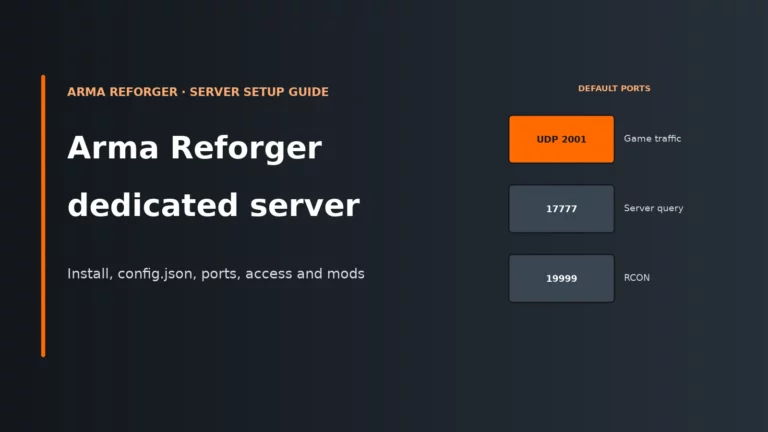
| Ports | 2001 UDP game, 17777 UDP A2S query, 19999 RCON. | These matter for firewall rules, NAT and remote administration, not for sizing RAM. |
maxPlayers |
Range 1..128, default 64. Bohemia’s own example config uses 32. | Set the player cap to what your scenario can actually simulate, not to the biggest number you can type in. |
-maxFPS |
Bohemia heavily recommends a value between 60 and 120. Managed hosts usually set 60 for you. | This defines the server frame budget. Without it, the server can try to consume all available resources. |
| Docker example | 4 CPU cores and 6 GB memory assigned to Docker. | Even Bohemia’s own test container gets more than 4 GB, but treat it as an example allocation, not a requirement. |
| RAM or CPU per player | Not published. | There is no official “MB per slot” formula, so host advice is based on observed baselines and scenario type. |
| Steam client hardware | 8 GB RAM minimum, 16 GB recommended for the game client. | Those figures are for playing the game, not for the dedicated server by itself. They only become relevant if the same PC is doing both jobs. |
The baseline: what the server uses before anyone plays
The first reason Arma Reforger server requirements look vague is simple: the idle server is not tiny. Before you think about slots, AI or mods, there is already a meaningful memory bill to pay.
Look at the baseline first, then look at what room is left on the plan.
Across published host observations, a freshly started stock server lands at about 2.4 GB to roughly 3 GB even with nobody connected. Bohemia’s own stats example goes further: with only 2 players and 104 AI, the server is already at about 3.3 GB. That is why a 4 GB plan can work only for very light setups: you may have roughly 1 GB left after a roughly 3 GB baseline, which disappears quickly once the scenario starts doing real work. By contrast, a 6 GB plan leaves about 3 GB headroom, and an 8 GB plan about 5 GB.
You can watch this with -logStats. Bohemia’s example line looks like this:
FPS: 60.0, frame time (avg: 16.7 ms, min: 9.3 ms, max: 23.7 ms), Mem: 3291106 kB, Player: 2, AI: 104, Veh: 0 (17) ...
The Mem figure is memory in kB as reported internally by the server. It is useful for trends, but it is still approximate rather than a perfect match for what the operating system reports. What matters is not the exact last digit; it is whether memory climbs close to your plan limit when the server is loaded in the way your group actually uses it.
That baseline is the main reason “8 GB” and “64 slots” are answering different questions. One is a memory ceiling. The other is only a join cap.
What really loads an Arma Reforger server: scenario and AI first
Two servers can have the same slot count and wildly different load. The big driver is the scenario’s simulation work: AI, persistence, building, logistics, spawned content and how far the server has to keep the world relevant.
This comparison is the key point: same slots, very different server stress.
aiLimit -1 (no limit), view distance 2500Load grows as the Game Master spawns units and objects
disableAI true, default view distance 1600No AI pathing or perception to simulate
Conflict is usually the expensive case because it creates sustained CPU work. Base building, supply lines and persistent AI logistics keep the simulation busy across the whole session, not just during one short firefight. Game Master often starts lighter because it begins without pre-placed AI, but it can still grow heavy later if the session fills up with spawned units and objects. A PvP mode with AI disabled is cheaper again, even at the same slot count, because the server is no longer spending frame time on AI thinking, movement and pathing.
The core keys behind that look like this:
{
  "operating": {
    "aiLimit": -1,
    "disableAI": false,
    "disableNavmeshStreaming": false
  },
  "gameProperties": {
    "serverMaxViewDistance": 1600,
    "networkViewDistance": 1500
  }
}
aiLimit: the default is-1, which means no limit. That is flexible, but it also means the scenario can keep creating CPU work until the mission logic or the hardware becomes the brake. Lowering AI mainly relieves CPU on the main simulation loop. The trade-off is obvious: fewer bots and less of the AI-driven feel that makes Conflict what it is.disableAI: if you switch AI off entirely for a PvP mode, the server gets much cheaper to run. The trade-off is that every feature depending on AI disappears with it.disableNavmeshStreaming: this loads the full navmesh into memory. It can give slightly better AI performance because the server is not streaming navmesh chunks on demand, but it costs more RAM, potentially up to hundreds of MB depending on terrain. Use it only when RAM has room and AI behaviour is worth the extra footprint.serverMaxViewDistanceandnetworkViewDistance: higher values mean the server keeps more of the world relevant further out and replicates entities over a larger network range. That mainly costs CPU and bandwidth, not just memory. The trade-off is better long-range awareness for players versus more work every frame. Bohemia’s example config usesserverMaxViewDistance2500 andnetworkViewDistance1000, which is a good reminder that these are separate levers.
How do you tell whether a change helped? If you reduce AI or rein in view distances, the sign to watch is better server FPS and lower frame time under the same kind of fight, not a dramatic fall in idle memory.
CPU: frame budget first, core count second
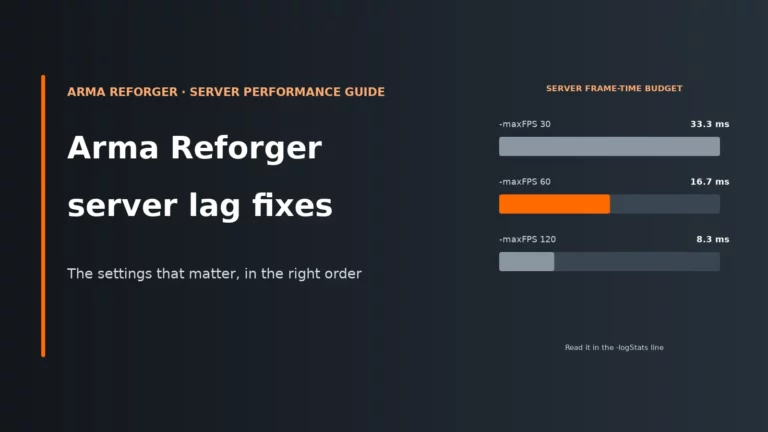
The server does not care about your advertised slot number nearly as much as it cares about finishing each simulation frame on time. At -maxFPS 60, the budget is about 16.7 ms per server frame. At 120, it is about 8.3 ms. If the work for that frame takes longer, server FPS drops below the cap and players feel it as sluggish updates, delayed reactions and a generally soft, heavy server.
This is why single-thread speed matters so much in Arma Reforger server requirements. Parts of the workload can be spread across worker threads, and Bohemia does expose short-job workers with -jobsysShortWorkerCount, but the whole frame is still gated by the work that must complete inside that update loop. Extra cores help with supporting jobs, networking and keeping the machine from feeling boxed in, but they do not magically remove the main bottleneck.
That lines up with the published host view that the server is bound by single-thread speed and, in practice, does not use more than about six threads well enough to justify chasing ever-higher core counts for one huge shard. The practical lesson is simple: four fast, stable cores are usually worth more than a pile of slower shared vCPUs.
A shared or oversold vCPU hurts because the server is not only short on raw speed; it is short on guaranteed access to that speed. Even if the average looks fine, your frame time spikes when the host scheduler is busy elsewhere. The clue is inconsistent frame times at similar load, especially if memory usage looks healthy. Spare RAM does not fix that problem, because the issue is not capacity; it is late CPU time.
Mods and disk: memory pressure is only half the story
Before mods, the dedicated server is roughly a 12 GB download on disk. After mods, saves and logs, that figure stops being the interesting part. Mods live in the server’s profile area by default, they must be delivered to clients, and large terrain packs can push both storage use and runtime memory noticeably upward.
Terrains are the usual heavy hitters. They cost disk space first, then memory once the server has loaded them. Host-published storage presets in the 20 GB to 50 GB range make sense for that reason alone, and a multi-terrain mod list can need tens of GB of storage on its own.
The safest admin habit is to add mods one at a time. That works because it turns a fuzzy “the server feels heavier now” problem into a clear before-and-after change. Watch three things after each addition: idle Mem, start-up time, and peak memory during a real session. If you are running in a container and large mods hit write errors while downloading, -addonTempDir exists for that edge case.
Published host advice side by side
The host advice looks inconsistent because the assumptions underneath it are different. One host sizes by simulation first and treats slots as secondary; another publishes broad public-server bands; another points you at the idle baseline and tells you to watch memory in a real session.
| Published by | Small group | About 32 players | 64 players | 96 to 128 players |
|---|---|---|---|---|
| Host A (by CPU and RAM) | 4 GB, 1 core (8–16) | 6 GB, 2 cores (24–48) | 8 GB, 4 cores (64–96) | 10 GB, 5 cores |
| Host B | Not given | 8 GB+, 4 fast cores | 16 GB+ | 16 GB+, top single-thread CPU |
| Host C | 2.4 GB idle, then watch it | Not given | Not given | Not given |
| Host D (unlimited slots) | 4–6 GB, no mods | 8–10 GB with some mods | 8–10 GB with some mods | 14–18 GB, many mods |
The useful reading of that matrix is not “one of them must be wrong”. It is that 4 to 6 GB only makes sense for genuinely small, light servers; 8 GB is where about 32-player Conflict starts to look sensible; and the 12 GB to 16 GB range is where larger, modded or AI-heavier Conflict servers stop feeling squeezed. The reason the same advertised slot count can land in different rows is that Conflict, Game Master and AI-disabled PvP are not remotely the same workload.
Player slots explained: cap, queue and pricing
maxPlayers is just the upper gate. Officially it ranges from 1 to 128 and defaults to 64, while Bohemia’s own example config uses 32. That should tell you enough already: the right slot count is the one your CPU and scenario can sustain, not the default number in the file.
- Join queue:
operating.joinQueue.maxSizeranges from 0 to 50 and defaults to 0, so it is off unless you enable it. - Slot reservation:
slotReservationTimeoutranges from 5 to 300 seconds and defaults to 60. This keeps a slot for someone who disconnected. - Admin priority queue: since 1.3.0, up to 20 listed admins can get priority in the join queue.
Those settings matter because a full server does not always mean “buy more slots”. Sometimes it means “stop losing reconnects”, or “turn on a queue”, or “do not let a reservation window hold places longer than the group actually needs”.
Pricing models make this murkier. A slot-priced plan is selling access limits. A RAM-priced plan is selling capacity. Arma Reforger leans towards the second model because the simulation load does not scale cleanly with headcount. If you want the pricing logic behind that, read why slots and RAM are priced differently.
| Plan type | Example price | What you actually get | Question to ask |
|---|---|---|---|
| RAM-priced 4 GB | £3.75/mo ($4.99) | A low memory ceiling, which is tight once a stock server baseline is counted. | What CPU allocation comes with it, and is 4 GB enough for anything beyond a very light setup? |
| RAM-priced 6 GB | £11.28/mo ($15.00) | A more realistic floor for a small vanilla or light Game Master server. | Are cores dedicated or shared, and can you move to 8 GB without rebuilding? |
| RAM-priced 8 GB | £7.51/mo ($9.99) | A better starting point for around 32-player Conflict than any 4 GB offer. | Does storage rise with RAM, and what CPU class is attached to it? |
| Slot-priced 10 slots | £10.25/mo | A small admission cap, but no automatic proof of spare RAM or fast cores. | How much RAM and CPU is behind those 10 slots? |
| 8 GB / 40 slots entry plan | £15.04/mo ($20.00) | A mixed model: one hard slot cap plus a stated memory ceiling. | Which limit will you hit first in Conflict: memory, CPU or slots? |
| 10 GB / 10 slots plan | From £9.99/mo | Plenty of RAM for a private group, but not many admissions. | Can you raise slots later without changing the whole plan? |
Conversion used: £1 = $1.33
Our starting-point sizing table
These are starting points, not official requirements. They are built from the published host floors and bands above, plus the known idle baseline. The reason 4 GB is missing is simple: it can work, but only for very light setups and with little room for mistakes.
| Your server | RAM | CPU | Step up when |
|---|---|---|---|
| Small vanilla group up to 16 / Game Master | 6 GB | 2 fast cores | Idle memory is already close to the limit, Game Master sessions fill up with spawned AI and objects, or you add several mods. |
| Conflict around 32 players | 8 GB | 4 fast cores | Server FPS drops in normal fights, memory peaks start brushing the plan ceiling, or you raise view distances above sensible defaults. |
| 48-64 players or a modded Conflict | 12 GB | Fast 4+ cores | Long sessions keep accumulating load, terrain mods raise memory, or AI and logistics are the main content rather than just player-versus-player fights. |
| 64-128 or heavy mods and AI | 16 GB | Top single-thread CPU, or two servers | One large shard stays CPU-bound even with spare RAM, or your design depends on big AI counts and a heavy mod stack. |
If your server is mostly PvP with AI disabled, you can often start lower than the same slot count in Conflict. If it is Conflict with uncapped AI and ambitious view settings, assume the opposite.
Self-host or rent
Self-hosting can make sense for a private group, but only if you size the machine for two jobs at once. The Steam client’s 8 GB minimum and 16 GB recommended RAM figures are for playing the game, not for running the dedicated server as well. If the same PC is playing and hosting, add the server’s own roughly 2.4 to 3 GB baseline before a real session even starts, then remember that both the game client and the server are fighting for the same CPU time and storage.
Listen servers are started in-game, are PC only, and are best thought of as convenience hosting. A proper dedicated server runs separately on Windows or Linux and wants the official ports opened: 2001 UDP for the game, 17777 UDP for A2S query and 19999 RCON. If you are weighing the trade-offs, start with our guide to self-hosting a game server, then compare your spare machine against general game server hardware requirements.
Check it under load before you call it finished
One clean boot tells you very little. Run a proper session with -logStats 10000 so the server writes a stats line every 10 seconds, then read the session as a whole: idle, first joins, combat peak, autosaves and the late-session state. For deeper tuning detail, use our Arma Reforger performance and lag guide.
| Symptom | Likely cause | First fix |
|---|---|---|
| Server crashes or restarts as players join or when the scenario loads | Memory ceiling reached by baseline, scenario and mods together | Move up a RAM tier or remove the heaviest terrain/mod first |
| Server FPS drops below the cap in big fights but memory looks fine | CPU frame budget is blown by AI, simulation or long-distance relevance | Reduce AI pressure or lower view settings; if that fails, move to a faster CPU |
| Rubber-banding while FPS stays at the cap | Network replication range is too ambitious, or the host’s shared CPU time is uneven | Lower networkViewDistance first and look for steadier frame times |
| Server is much slower to start after adding mods | Every listed mod is checked and loaded at startup, and large terrains take the longest | Add mods one at a time and remove the last heavy addition first |
| Memory sits near the limit at session peak | The plan is too tight for the live workload | Go up in RAM; 4 GB is particularly easy to outgrow |
| Fine after restart, worse a few hours later | The session is accumulating AI, objects or persistence state over time | Audit the scenario’s spawned content and watch Mem and FPS across the full session |
| Players get “server full” at 64 | The default maxPlayers cap is still in place, or you chose it without matching hardware |
Set maxPlayers deliberately and only raise it if performance allows |
| Queue forms at peak | Demand exceeds the join cap, or reservations are holding places too long | Enable or tune the join queue, and shorten reservations if they are too generous |
| Short hitches line up with saves | Autosaves writing the session state to disk (every 10 minutes by default) | If you shortened autoSaveInterval, put it back towards 10 minutes; ask your host about NVMe storage |
Tune it or upgrade?
| What you see | Tune first | Why it works | Trade-off for players | Upgrade instead when |
|---|---|---|---|---|
| Memory close to the plan limit, but server FPS is stable | Trim terrain mods, add mods one at a time, leave navmesh streaming on | This cuts RAM and disk pressure rather than CPU work | Smaller mod list, fewer map options, slightly less aggressive AI-side optimisation | A near-stock server still peaks too high for the plan |
| FPS below cap while memory is comfortable | Lower AI pressure and bring view settings back towards sensible values | This reduces main-thread work each frame, which is the usual limiter | Fewer AI, shorter sight lines, less distant activity | Normal settings still miss the frame budget on a full session |
| Rubber-banding with decent FPS | Lower networkViewDistance |
The server has fewer distant entities to replicate and track over the network | Distant activity stops updating as far out | Even stock-like settings are erratic on a shared plan |
| Slow starts and long restarts after mod changes | Remove heavy terrain packs or simplify the mod stack | This reduces storage churn and the amount of content loaded at boot | Less variety in maps and features | The mod set is required and the plan lacks storage headroom |
| Server full or queue all evening, but performance is healthy | Use join queue and reservations properly before raising the cap | This manages access without forcing more simulation load straight away | Some players wait instead of joining instantly | The demand is constant and the server still has clear CPU and RAM room |
| One large public server is always CPU-bound | Split the community across two servers | One simulation ceiling is often harder than two smaller, healthier ones | Players are split across sessions | You must run one big shard and are already on a top single-thread CPU |
If you are deciding between slot-priced and RAM-priced plans, our Arma Reforger server hosting comparison makes it easier to see which providers give you room to scale Conflict, mods and AI rather than just selling a big slot number.
Compare the best Arma Reforger server hostsArma Reforger server FAQ
How much RAM does an Arma Reforger server need?
There is no official Bohemia figure, but the published baseline is the important clue: a stock server already uses about 2.4 to 3 GB before a real session gets busy. That makes 6 GB a sensible floor for a small vanilla group, 8 GB a stronger start for around 32-player Conflict, and 12 GB to 16 GB the safer range for larger, modded or AI-heavy setups.
Is 4 GB enough for an Arma Reforger server?
Only for very light cases. Once you start from a roughly 3 GB baseline, there is not much room left for scenario growth, mods, terrain overhead or long sessions. A 4 GB plan makes far more sense for a small PvP or light Game Master setup than for Conflict.
How many players can an Arma Reforger server hold?
Officially, maxPlayers can be set from 1 to 128, with a default of 64. In practice, the sustainable number depends far more on scenario design, AI and CPU speed than on the raw slot setting. A 64-player PvP server with AI disabled can be much easier to run than a smaller Conflict server.
Does an Arma Reforger server need a fast CPU or more cores?
Fast single-thread performance matters most because the server has to finish its simulation frame on time. Extra cores still help with worker jobs and general breathing room, but after a point they are secondary to per-core speed and stable CPU allocation. If server FPS falls while memory is fine, more RAM will not fix it.
Do more player slots mean I need more RAM?
Not directly. More players can increase load, but slots are only a cap on joins, while the heaviest costs usually come from AI, scenario logic, view distances and mods. That is why an “8 GB / 40-slot” plan can be a better fit than a “64-slot” plan that tells you little about the hardware behind it.
More Arma Reforger server help
Set up your server, fix lag, or compare hosts that fit your scenario.
Game updates and host panels change; if a setting name, default or menu path differs on your server, follow your host’s current panel and the current Arma Reforger build.