
How Much RAM Does a Space Engineers Server Need?
Match Space Engineers server RAM to the save you actually want to run: player count, planets or space, grids, mods and world age. Learn what fills the memory, how to measure it and how to cut it before you buy a bigger plan.
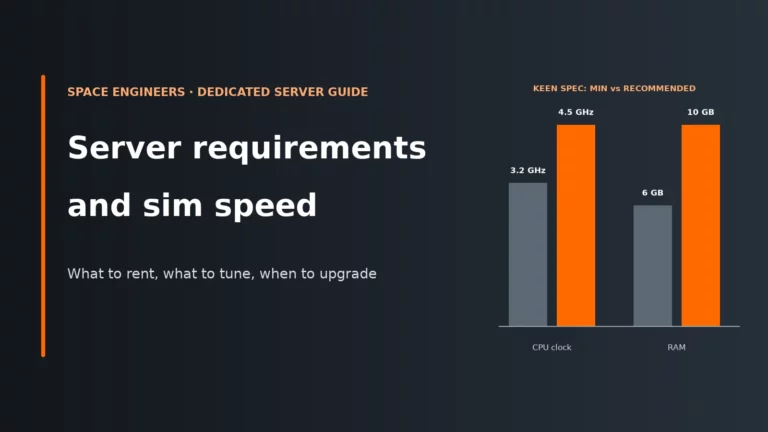
Keen’s minimum for the dedicated server is 6 GB RAM. Below that, the server can still run, but Experimental mode is force-enabled.
Keen recommends 10 GB. That is the point where planets, voxel edits and a save that keeps growing are less likely to paint you into a corner.
Host guidance broadly lands at 6 GB for small standard worlds, 8 GB for 5-8 players, and 16 GB for up to 16 players or large grid and mod-heavy saves.
More memory does not raise sim speed by itself. If the world has spare RAM but poor simulation performance, you are usually looking at CPU or entity load instead.
Keen’s numbers are a real line, not a vague suggestion
Keen’s official dedicated server documentation puts the minimum at 6 GB RAM and the recommended figure at 10 GB. The same page also makes an important point that a lot of plan menus hide: if the hardware is below the minimum, the server still starts, but Experimental mode is turned on automatically. You can force Experimental on yourself, but you cannot force it off if the server does not meet the threshold.
That matters for more than a warning label. Experimental dedicated servers are not visible in the console server browser while console players are in Safe mode, so a low-memory server can create a discovery problem for crossplay groups even before it crashes. Safe mode exists to keep performance predictable on lower-end platforms; Experimental lets servers push beyond those limits.
Keen’s figures are also about the server process, not your whole computer. On a rented plan, the RAM on the label is the RAM the server is allowed to use. On a home Windows machine, Windows itself needs a few GB first, so “I have 10 GB in the PC” is not the same as “the server has 10 GB available”. If you are new to that split between capacity, CPU speed and storage behaviour, this is a good example of how game server hardware requirements work.
Two other official details are worth keeping straight. The dedicated server is Windows only, and it does not need a GPU. Keen also notes that several instances can run on one PC, but only as far as memory and performance allow, which is another reminder that every extra save is competing for the same pool.
What actually fills Space Engineers server memory
The dedicated server keeps the world live in memory. That is why an “empty” server still needs several GB, and why an old save can consume far more RAM than a fresh one with the same player slots. The matrix below is the quick map from memory growth to the setting that usually controls it.
| Part of the world | Held in RAM | Grows as the save ages | A setting can cut it |
|---|---|---|---|
| Planets and voxel edits (MaxPlanets, voxel reverting) | Yes | Yes | Yes |
| Procedural asteroids (ProceduralDensity, ViewDistance) | Yes | Partly | Yes |
| Grids and blocks (trash removal, block limits and PCU) | Yes | Yes | Yes |
| Floating objects (MaxFloatingObjects) | Yes | Partly | Yes |
| NPCs and bots (TotalBotLimit) | Yes | No | Yes |
| Mods and Torch plugins (your mod list) | Yes | Partly | Partly |
| Economy store data (EnableEconomy) | Partly | No | Yes |
| Backups and logs (MaxBackupSaves) | No | Yes | Yes |
The world shell: planets, asteroids and voxel edits
Planets ask more of a server because they are large voxel bodies that collect persistent edits. Digging, blasting and tunnelling leaves changed voxel data behind, and the save must remember it. Space-only worlds are usually lighter because they avoid planet terrain entirely. Asteroids are not free either: ProceduralDensity changes how many procedural asteroids can exist, and ViewDistance also sets the range for procedural asteroid generation, so a larger view distance gives the server more room to generate and retain world content.
Grids, blocks and everything players leave behind
Ships, stations, welders, wrecks, drones and half-finished frames all live as grids. More blocks means more definitions, inventories, physics state and network state. PCU is Keen’s performance cost unit per block, and block limits are one of the few settings that directly cap future world growth. This is why a four-player world full of abandoned miners and giant faction bases can need more RAM than a tidy server with far more slots.
Streaming around each player
SyncDistance controls how far around each player the server keeps entities synchronised. A higher value means more of the world stays active for each person. If your group spreads across different planets, moons or sectors, the server has to keep more separate pockets of the world ready at the same time.
Floating objects, bots, economy and plugins
Dropped ore, components and bottles are small individually, but lots of them create clutter that the server must track. MaxFloatingObjects caps that. NPC and bot activity does the same job from another angle; TotalBotLimit (default 32) limits how many can exist. The economy system only adds a few MB of store data in the save, so it is rarely the main culprit on its own. Torch plugins can add memory use too, especially if they maintain their own data or cleanup state.
Mods and scripts
Mods load extra definitions, models, blocks, scripts or behaviours into the world. The important part is not the count of mods but the kind of mod and the size of the save they help create over time. A modest decorative pack and a large scripted overhaul do not behave the same way in memory.
What is not RAM
Backups, logs, the dedicated server install and downloaded mod files live on disk. Keen says the install is roughly 8 GB, and logs, saves and mods can get pretty large, but that is storage use, not live memory. Do not confuse “my backups folder is huge” with “my server needs more RAM”, even though both matter for a healthy machine.
RAM starting points by the save you want to run
Pick RAM by world shape and save age, not by slot count alone. These starting points combine Keen’s official figures with common hosting guidance.
| World type | Players | What loads | Starting RAM | Why |
|---|---|---|---|---|
| Small co-op space-only or starter star-system world, vanilla | 1-4 | Few active locations, modest grids, little world history | 6 GB | Keen’s official minimum, and the usual host guidance for a small standard world when builds stay controlled. |
| Friends server with separate ships and bases | 5-8 | More streamed areas, more grids left around, more inventories | 8 GB | A common host step-up when the group is larger but the save is still fairly standard. |
| Planets plus growing permanent builds | Small to medium group | Planet voxels, mining scars, longer-lived structures | 10 GB | Keen’s recommended figure gives headroom above the minimum for a world that is meant to last. |
| Faction world or mod-heavy save | Up to 16 | Many grids, more active regions, heavier content load | 16 GB | Common hosting guidance places this tier at larger worlds, heavier mod use and bigger groups. |
| Long-running modded faction world with many large grids | Varies | Old bases, capital ships, voxel edits, mod data, admin tools | Start at 16 GB and measure | World age matters more than the slot count. Only move above this when measured peaks actually demand it. |
A quick warning on the low end: some host menus include 4 GB plans, but that sits below Keen’s minimum. For a persistent shared server, that is not a sensible place to start unless you are comfortable with forced Experimental mode and almost no growth room.
Why player count matters less than what those players build
Space Engineers lets a dedicated server set MaxPlayers anywhere from 2 to 64, but that number is only an access ceiling. It does not tell you how heavy the save will be. The server load comes from how much of the world exists, how spread out people are, and how much persistent junk the save is carrying.
SyncDistance is the key setting here. It defines how far around each player the server keeps entities synchronised and streamed. If everyone is working at one shipyard, the server is maintaining one busy bubble. If each player is on a different planet or distant grid, the server is maintaining several bubbles, often with different grids and voxel areas active in each.
<SyncDistance>3000</SyncDistance>
<ViewDistance>15000</ViewDistance>
The official wiki warns that high sync distance can slow the server drastically, and console-compatible servers cap it at 2000 m. Both lines above show the defaults; SyncDistance accepts 1000 to 20000 m. ViewDistance matters too because it also affects the range for procedural asteroid generation. In plain terms, a low-population world where people roam far and leave infrastructure everywhere can outgrow a busier but tidier world very quickly.
Mods, scripts and the 3 GB console-compatibility line
Since update 1.206, mods do not require Experimental mode by themselves. That is useful, but it does not mean mods are free. Mod-heavy worlds tend to load more definitions, blocks and state into memory, and they usually encourage more complex builds that stay in the save for longer.
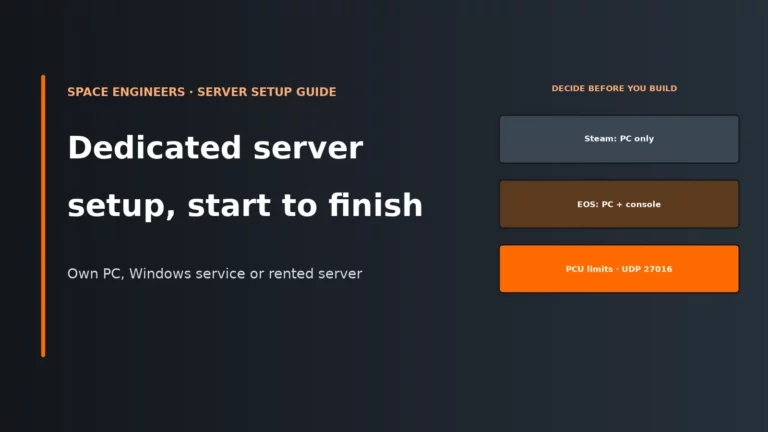
If console play matters, keep one official rule in mind: console compatibility is automatically disabled in the dedicated server GUI if the total mod size exceeds 3 GB, or if PCU block limits are not set. That 3 GB figure is about total mod size on disk, not a direct reading of RAM use, but it is still a practical warning sign that your mod stack is getting large.
Torch and plugins belong in the same conversation. Torch is a popular wrapper for Space Engineers servers, and plugins can be very useful, but each one adds another moving part with its own state, cleanup rules or logs. The safe admin habit is simple: add mods and plugins in batches, restart, check memory, then add the next batch. If you throw everything in at once, you will not know which change actually pushed the save over the line.
How to measure your real RAM usage
Do not guess from the plan label. Measure the server at three moments: straight after a clean restart, after the usual players have logged in and spread out, and just before the next scheduled restart. The flow below helps separate a true memory problem from CPU, storage or settings.
- Fresh restart: on a self-hosted machine, open Task Manager and watch the SpaceEngineersDedicated process. On a rented server, use the panel’s memory graph. This is your baseline.
- Normal play session: check again once the usual group is online and active in different places. This shows live operating usage, not just idle usage.
- Before the next restart: check one more time after the world has had time to collect debris, floating items, voxel edits and new grids. This shows whether memory creeps upwards as the save ages.
Patterns matter more than one reading. A steady climb across days usually means world growth: more builds, more debris, more voxel edits, more modded content. A sharp spike while loading or saving points to high-water moments where the save barely fits. On rented plans, a crash or restart at a suspiciously neat ceiling usually means you hit the hard memory cap. On self-hosted Windows, exhausting physical RAM pushes the system towards disk swapping, and storage is far slower than RAM, so the result is stutter and instability rather than a graceful slow-down.
Also read the server log for the line that states the Experimental mode reason. That tells you whether the server was pushed into Experimental mode by hardware below the threshold, a world setting, or plugins. If your server has spare RAM but poor sim speed, that is a different problem; use our guide to Space Engineers server requirements and sim speed instead of buying memory blindly.
How to cut RAM use without buying more
Most memory savings in Space Engineers come from reducing persistent world clutter, not from one magic toggle. Edit Sandbox_config.sbc only with the server stopped. If you need file locations or the basics of the Windows dedicated server, see how to set up a Space Engineers dedicated server.
1) Turn trash removal into a real policy
Trash removal works because every abandoned micro-grid, starter pod fragment and loose drone wreck still has to be loaded with the world. The defaults already mark tiny grids as candidates, but you need rules that match how your group actually plays.
<TrashRemovalEnabled>true</TrashRemovalEnabled>
<BlockCountThreshold>20</BlockCountThreshold>
<PlayerDistanceThreshold>500</PlayerDistanceThreshold>
<PlayerInactivityThreshold>YOUR_HOURS</PlayerInactivityThreshold>
Why it helps: fewer dead grids means less persistent entity data in RAM and less save bloat on disk. Trade-off: players can lose tiny utility craft or forgotten test rigs if your rules are too aggressive. How to tell: after cleanup and restart, baseline memory should be lower and the server should load faster.
2) Enable voxel reverting if your worlds get mined hard
Voxel edits are permanent unless you tell the server to revert old ones. Planet boreholes, crater fields and stripped asteroid tunnels all add up. Voxel reverting is off by default; the age threshold is in minutes.
<VoxelTrashRemovalEnabled>true</VoxelTrashRemovalEnabled>
<VoxelAgeThreshold>24</VoxelAgeThreshold>
The official voxel cleanup also uses a 5000 m grid and player distance threshold, so active mining sites stay intact while abandoned scars can be restored. Why it helps: the save no longer has to remember every old voxel edit forever. Trade-off: old hidden tunnels, hand-cut shelters and scenic damage disappear when abandoned. How to tell: long-term memory creep slows, especially on planet-heavy or mining-heavy saves.
3) Cap floating object clutter
MaxFloatingObjects defaults to 100 (the allowed range is 2 to 100, and console-compatible servers cap it at 50). If your server often has clouds of dropped ore and components after mining or combat, lowering that cap reduces how many loose objects the world retains. Why it helps: each item carries position, ownership and network state. Trade-off: less time to recover dropped loot. How to tell: memory and clutter stop spiking after battles or large refinery sessions.
4) Reduce asteroid generation pressure
ProceduralDensity controls how many procedural asteroids can exist, and ViewDistance sets the range for procedural generation. Lowering either reduces how much space content the server needs to create and remember. Why it helps: less world content exists in the first place. Trade-off: emptier exploration and less dramatic long-distance scenery. How to tell: new worlds start with a lower memory baseline and wandering scouts stop inflating the save as quickly.
5) Be honest about planets
MaxPlanets exists for a reason: it defaults to 99, while console-compatible servers are capped at 3, and the wiki notes that predefined asteroids are disabled on consoles to conserve memory. If you do not need a planet-heavy star system, choose fewer planet types or a space-only scenario. Why it helps: planets bring large voxel bodies and encourage persistent terrain edits. Trade-off: less environmental variety. How to tell: the world starts lighter and remains easier to keep under control over time.
6) Use block limits and PCU to slow future growth
Block limits are not a RAM trim for the current session; they are a growth control. By capping how much players can place, you slow down the rate at which the world accumulates new blocks and grids. Why it helps: less total build volume means fewer entities to keep loaded. Trade-off: less freedom for mega-projects. How to tell: the memory graph grows more slowly week by week instead of jumping after every building spree.
7) Remove unused mods, not just disabled ambitions
If a mod is no longer needed, remove it carefully and restart before judging memory again. Why it helps: unused content no longer has to be loaded. Trade-off: removing a mod that existing grids depend on can break those grids or the save. How to tell: compare fresh-restart memory before and after the change, not just mid-session readings.
8) Use Torch cleanup tools carefully
If you run Torch with Essentials, list candidates before deleting them. A command such as !cleanup list notype beacon blockslessthan 100 lets you review small grids without beacons before you remove them. Why it helps: abandoned junk often dominates old worlds. Trade-off: cleanup rules that are too broad will delete things players still care about. How to tell: after cleanup and restart, both memory use and load time should improve if old debris was the real problem.
Symptom, likely cause, first fix
| Symptom | Likely cause | First fix |
|---|---|---|
| Crash on load | The save and mod set no longer fit the plan or the free RAM on the machine. | Watch memory during startup, remove the newest mods first, then clean world clutter or move to the next RAM tier. |
| Crash during autosave | The server is hitting a memory peak while saving, or the host machine is already under memory pressure. | Check memory at save time, clear abandoned grids and floating objects, and make sure the machine still has healthy free disk space for saves and backups. |
| Slow startup | Large save, many grids, many mods, or lots of old world history to load. | Trim unused mods and run cleanup before assuming you need more RAM. |
| Plan RAM graph sits on the cap | The rented plan limit is a hard ceiling and the save has grown into it. | Clean up first; if usage returns to the cap after a restart cycle, upgrade the plan. |
| Low sim speed with spare RAM | Main-thread CPU load, physics load or too many active entities, not a memory shortage. | Do not buy RAM as the first response; review CPU-focused settings and entity load instead. |
| Console players cannot see the server | Experimental mode is active, or console compatibility is disabled because total mod size exceeds 3 GB or PCU block limits are not set. | Check the log’s Experimental mode reason, confirm the mod-size line, and make sure block limits are enabled if you need console compatibility. |
| Memory rises every day | Persistent world growth from new grids, voxel edits, dropped items and accumulated debris. | Enable cleanup and voxel reverting, schedule regular restarts, then compare before-and-after baselines. |
Tune it first or upgrade now?
The right move depends on where the pressure shows up. RAM is worth paying for when measured peaks keep hitting the ceiling after sensible cleanup. It is wasted money when the problem is really CPU, bad mod hygiene or a world that just needs pruning.
| What you see | Tune first | Upgrade when |
|---|---|---|
| Fresh-restart memory is reasonable, but usage creeps up by the next restart | Trash removal, voxel reverting, lower floating object clutter, remove unused mods | The save still reaches the cap after cleanup and a clean restart cycle |
| The world only struggles after planets, larger bases and regular mining enter the picture | Lower asteroid density or view distance, review planet count, cap future build growth | You want to keep that world style and 10 GB or 16 GB is the next sensible tier |
| Memory spikes only after adding a mod batch or Torch plugin | Roll back the recent additions and re-add in smaller batches | You have confirmed the content is required and the measured peak still exceeds the tier |
| Empty or near-empty world is already close to the cap | Re-check that the plan is not below Keen’s minimum and verify Windows overhead on self-hosting | The baseline itself is too high for the current plan, with no cleanup left to do |
| Low sim speed with RAM to spare | Do not tune memory; look at CPU and active simulation load | Never as a first fix for this symptom |
If you are weighing 6 GB, 10 GB and 16 GB tiers side by side, our Space Engineers server hosting comparison helps you line up entry RAM, upgrade paths and the sort of server setup each tier suits.
Compare the best Space Engineers server hostsSpace Engineers server FAQ
Is 6 GB of RAM enough for a Space Engineers server?
Yes, for a small vanilla server it can be enough, especially around 1-4 players in a standard world with controlled builds. It is also Keen’s official minimum. The catch is growth: once planets, old bases, mining scars and mods start to pile up, 6 GB stops being comfortable very quickly.
How much RAM do I need for a modded Space Engineers server?
Start from the world type, then add caution for mods. For planets and a growing persistent save, 10 GB is a safer baseline; for mod-heavy worlds or larger faction servers, 16 GB is the usual starting tier. After that, measure real usage rather than assuming every extra mod pack needs a bigger plan.
Does more RAM improve sim speed in Space Engineers?
No, not by itself. More RAM prevents crashes, hard caps and Windows swapping, but it does not make the main simulation thread run faster. If the server has spare memory and poor sim speed, the real bottleneck is usually CPU or active world complexity.
Do planets use more RAM than asteroids?
In practice, usually yes, because planets are large voxel bodies and they collect persistent edits from mining and combat. Space-only worlds are often easier on memory. Asteroids still matter, though, especially if procedural density is high and view distance allows a large generation range.
Why does my Space Engineers server crash when the world loads?
World load is one of the highest memory moments, so a save that used to fit can start crashing once it has aged, gained more grids or picked up more mods. On a rented plan, that often means the world now exceeds the hard RAM cap. On a self-hosted Windows machine, it can also mean the server plus Windows no longer fit comfortably in physical memory.
More Space Engineers server help
Compare hosts, fix low sim speed, or set up your own dedicated server.
Game updates, server panels and wrapper tools change over time. If a current host panel labels a setting differently from this guide, follow the host’s current wording and layout.