
Streamline Servers Review 2026
We tested Streamline Servers as a real customer, set up a server and spent most of the review inside the control panel using console and file access. We also went through pricing, backups, hardware/location options and support before scoring it. We tested Streamline Servers as an actual customer and spent most of the review inside Modified TCAdmin, working through the console, files and the normal day-to-day server controls instead of judging it from the pricing page. Streamline Servers feels like an old-school serious host that has kept expanding instead of trying to become fashionable. The company has been around for more than a decade, game servers still lean on a heavily modified TCAdmin workflow, and the newer Cloud Gaming Server product can swap games while scaling CPU, RAM and storage. There are around 20 locations worldwide, and current public support feedback remains strong despite a relatively small recent sample. In our use, the panel is powerful rather than beautiful. For experienced admins, that is often the right trade.
Quick verdict
What we found after testing Streamline Servers
After testing Streamline Servers ourselves, our score is based on how the service behaved once we were actually inside the panel, managing the server and dealing with support, not on the feature list alone.
The current cloud starter is around $11.25/month for one core at 4.6GHz, 2GB DDR4 and 20GB NVMe. Pro is around $22.50 for two cores, 4GB and 40GB. Larger configurations improve the resource economics and let communities consolidate several game servers.
TCAdmin still shows through the customisation. We did not call the interface modern, but it has a decade of game-hosting logic behind it. For a Rust, ARMA or multi-server community, depth matters more than rounded cards.
Streamline Servers at a glance
The important stuff before you buy
Score breakdown
Where the 8.3 comes from
Pricing and value
What the current price really buys
When we priced Streamline Servers, we configured the same kind of server we had just tested and followed it through checkout. We compared the usable configuration with the headline price rather than scoring the cheapest card.
We went through the Streamline Servers pricing flow after the hands-on test and checked what the configuration actually cost once the useful RAM, location and server options were selected. Streamline sells both game-specific servers and Cloud Gaming Servers. Current cloud examples start around $11.25/month for one 4.6GHz core, 2GB DDR4 and 20GB NVMe, while a two-core 4GB tier starts around $22.50.
The Cloud product makes more sense at larger allocations where multiple games or instances can share the purchased resource pool. We did not buy the 2GB starter to host three demanding games just because the panel technically supports multiple installs.
Game-specific prices vary widely: current public examples include Palworld around $10.80, Rust $15 and Valheim around $9.38 before promotions. We compare the final game configuration, not the cloud starter, because they are different products.
| Plan / example | What you get | Current price |
|---|---|---|
| Cloud 2GB | Resource tier | $11.25 |
| Cloud 4GB | Resource tier | $22.50 |
| Cloud 8GB | Resource tier | $30 |
Prices and product details were checked in September 2026 and can change. We compare the configured server, not just the cheapest headline card.
Control panel
Modified TCAdmin: what it is actually like to use
When we opened the Streamline Servers panel, we skipped the tour and used console and file access straight away. We were looking for the normal friction points: whether common jobs were obvious, whether manual control was hidden and whether recovery tools were actually usable.
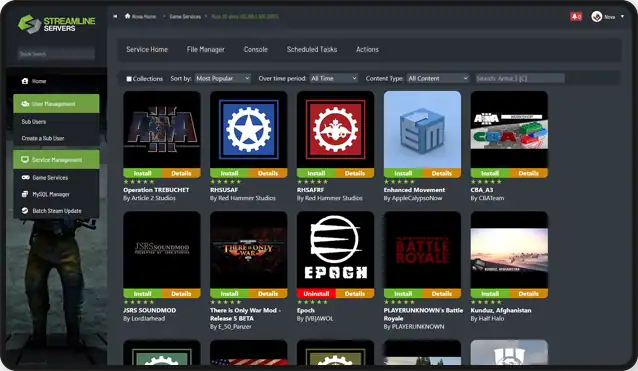
After using console and file access, our first impression was based on the workflow rather than the dashboard styling. Streamline’s panel is a modified TCAdmin experience. It looks more traditional than Apollo, MintPanel or PingPlayers, but it exposes deep controls and supports a huge number of game templates.
In our use, common server actions were straightforward, and experienced admins will recognise the mental model immediately. The underlying TCAdmin heritage is visible, but Streamline has customised enough around it that it does not feel like a completely stock install.
The provider-specific panel screenshot stays in the review. It accurately shows what we mean by powerful-but-traditional and helps set expectations before a buyer opens the account.
Hands-on take
What stood out after using Streamline Servers
The Cloud Gaming product is where we spent time experimenting. Swapping from Minecraft to Rust with a few clicks is convenient, but every game still has its own resource appetite. We archived/save data first and verify that the new game fits the CPU/RAM pool.
Sub-users are valuable for established communities. We can delegate selected management permissions without giving every admin billing access or full destructive control.
Batch controls and multi-server management also matter once there are several instances. A panel that can start, stop or update multiple game servers together saves time in a way a beautiful single-server dashboard cannot.
We chose Streamline particularly for games with established dedicated-server workflows such as Rust, ARMA or clustered survival environments. The host’s long history and TCAdmin foundation make more sense there than for somebody who only wants a tiny Minecraft world.
Latency should still be tested. Streamline advertises about twenty global locations, but current Trustpilot feedback includes a user who liked the service and support but left because their own route had latency problems. A global map is not a substitute for testing the actual ISP path.
Streamline’s wider infrastructure range also matters for communities that outgrow shared hosting. The company sells dedicated servers and networking products, so there is a plausible path from one game instance to bare metal without changing provider. We did not buy dedicated hardware prematurely, but knowing the path exists is useful.
The modified TCAdmin setup also has a practical advantage in documentation familiarity. Many game-specific guides and server owners already know the panel family. A new custom UI can be prettier while leaving a community dependent on provider-specific docs for every advanced task.
Hardware and locations
What we care about underneath the panel
We checked the hardware and location options that were actually available to our Streamline Servers server instead of giving credit for the best CPU or datacentre named anywhere on the marketing site. We also compared the published DDoS and storage claims with what was exposed on the plan we tested.
During the test, we checked the server/location information available to us against Streamline Servers’s published infrastructure claims. Streamline advertises around 20 worldwide locations and a broad mix of game, cloud, VPS and dedicated hosting. The Cloud Gaming product publishes CPU cores, RAM, NVMe storage and Windows/TCAdmin explicitly.
The company has long been strong in Australia/Oceania but also serves North America, Europe and other regions. London availability should be confirmed for the exact game because location stock can differ between products.
For large communities, Streamline also sells bare metal and high-capacity infrastructure. That broader capability is relevant because it provides an upgrade path beyond one shared game server.
Support and reputation
Our actual support experience
We tested support with a real technical server issue and scored the interaction on two things: how quickly a human replied and whether the answer actually moved the problem forward.
We opened a support ticket with Streamline Servers about a real server startup and configuration issue and got a human reply in 21 minutes. The reply was good overall. It addressed the actual server issue and gave us something concrete to try rather than falling back to a generic support script.
Recent positive stories mention multi-year Rust hosting, quick technical replies and staff offering credit/refund flexibility. There is also a 2026 one-star report describing a service-restoration failure and forced refund, so the picture is not universally perfect.
We weigh the long customer tenure heavily. Several reviewers describe using Streamline for years. For a provider this old, durable relationships tell us more than a short burst of launch-day reviews.
Pros and cons
What we liked and what held it back
- ✓ Long-established hosting company
- ✓ Cloud Gaming game switching
- ✓ Around 20 global locations
- ✓ Deep multi-server controls
- ✓ Good sub-user/admin tooling
- ✓ Strong long-term customer stories
- ✗ TCAdmin-derived interface looks dated
- ✗ Recent independent review volume is small
- ✗ Cloud starter pricing is not cheap for raw RAM
Who should buy it?
Is Streamline Servers the right fit?
Compare by game
See the best hosts for your game
FAQ
Streamline Servers frequently asked questions
What panel does Streamline Servers use?
What are Cloud Gaming Servers?
How many locations does Streamline have?
How is Streamline support?
Who should use Streamline?
Final verdict
Do we recommend Streamline Servers after testing it?
We used Streamline Servers again for a serious multi-game or established community setup. The product is not fashionable, but it has the controls and infrastructure depth that matter once hosting becomes operational work.
For one tiny server there are cheaper, prettier choices. For several games, sub-admins and a community that may eventually need larger infrastructure, Streamline makes more sense.
Check Streamline Servers pricing →
Affiliate disclosure: provider links may earn us a commission at no extra cost to you. Scores are based on product quality and value, not commission size.

I use and review game-server hosts from a buyer’s perspective: how the account feels, what the panel actually lets you do, how clearly plans are priced and whether the hardware, locations and support justify the bill.